- Why digital overload feels like mental weather — and how thoughts, emotions, and notifications stack into real cognitive storms
- How apps quietly shape your mood using color, spacing, algorithms, and dopamine-driven “rainbow” reward loops
- The psychology behind emotional scrolling — from cloud stacking and doomscrolling to digital rain (rants, archives, notes-app therapy)
- Your personal “cloud type” and how different minds react to content, stress, and online environments
- How designers and creators can build clear-sky experiences that reduce overwhelm, build trust, and offer ethical emotional relief
Somewhere inside every human being, there is a sky.
A private horizon where thoughts drift like clouds, emotions shift like weather, and the slightest digital notification can send a gust through our mental atmosphere to create digital overload.
In this inner world:
- Thoughts float.
- Emotions collide.
- Storms build.
- Rain releases.
And strangely…
our screens control more of this sky-weather than we think.
Every app you open, every swipe you make, every late-night scroll—it all becomes part of the invisible meteorology shaping your mood. And research keeps confirming the same pattern: the more tangled we get in problematic digital habits, the more our internal sky darkens.
A meta-analysis of 9269 young people found that increased problematic social media use correlates with depression, anxiety, and stress. The storms are not just poetic—they’re statistically significant.
Our online behavior isn’t random.
It’s meteorology for the mind.
Digital Overload: What Clouds Symbolize in Human Thinking
Let’s introduce our core metaphor: clouds as thoughts.
1. Clouds = Mental Tabs
You know how your brain feels when you have 50 tabs open?
That’s how your working memory operates—constantly processing.
- Each cloud = a mental tab.
- Too many clouds = cognitive overload.
And then there’s the Zeigarnik Effect:
If a task is unfinished, your brain refuses to let the “cloud” dissolve.
It lingers. Hovering. Making your sky feel heavier.
That’s why notifications feel like tiny storm clouds, blocking the sun of your focus.
2. Color, Density, Movement
Cloud aesthetics = direct mood metaphor:
- Light clouds → calm mind
- Grey clouds → rumination zone (focus on negative content = stress)
- Fast-moving clouds → anxious, hyper-alert brain
Digital Spaces as Weather Systems
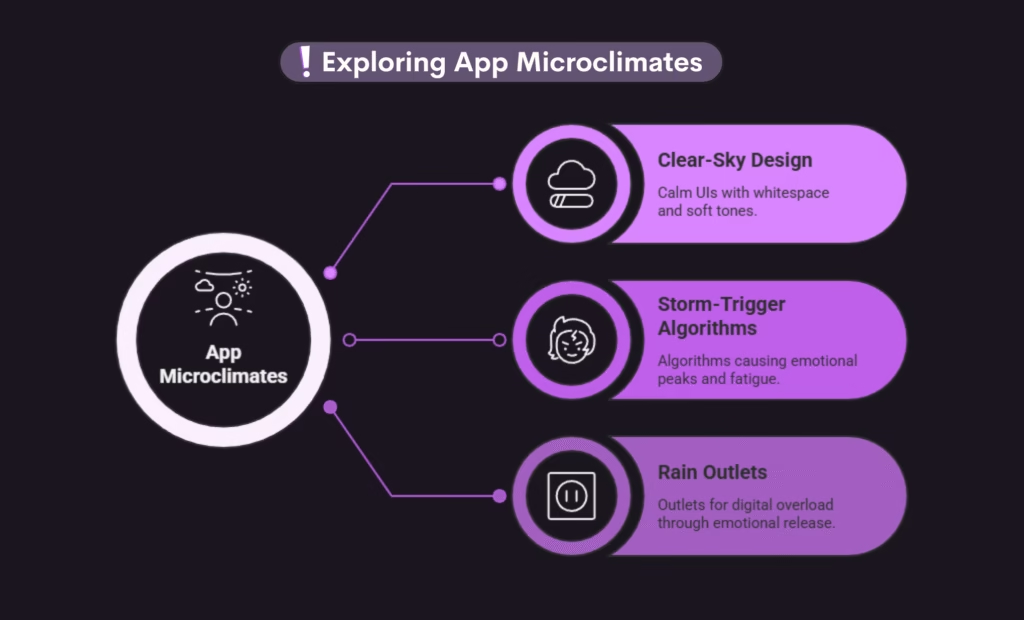
Apps aren’t neutral environments—they are full-blown microclimates.
1. Clear-Sky Design
Calm UIs = calm minds.
Brands like Apple, Pinterest, Muji use:
- whitespace
- airy spacing
- soft tones
- predictable patterns
… to create mental oxygen.
Clear layouts lower cognitive friction, meaning your brain doesn’t spend energy figuring things out. It just glides.
2. Storm-Trigger Algorithms
Platforms love storms. Why?
Because:
- emotional peaks = longer watch time
- surprise dopamine = stronger habits
- rapid-fire content = no pause to reflect
This is the digital thunderstorm effect: quick lightning bolts of stimulation followed by quiet crashes of fatigue.
Scroll fatigue?
That’s the “after-storm humidity” of the mind.
3. Rain Outlets
Humans need outlets for their digital overload, and apps know this.
We “rain” digitally through:
- story rants
- voice notes
- spam-posting
- private diary accounts
- comment dumping
Designers build “rain systems” on purpose:
- Headspace uses soft hues to lower arousal
- Journaling apps use textured backgrounds
- Disappearing stories encourage emotional release
- Anonymous question boxes invite confession
We’re not just scrolling—we’re leaking weather.
Cloud Personality Types
1. Cirrus Thinkers — the dreamers
Light, airy, aesthetic-curated minds.
- scroll for inspiration
- save more than they comment
- drift between apps like art museum rooms
- daydream mid-scroll
2. Cumulus Thinkers — the strategists
Stable, grounded, slow-to-react thinkers.
- research-oriented
- prefer long-form content
- organized collections
- predictable digital patterns
3. Nimbus Thinkers — the emotional scrollers
Deep, reactive, intense.
- feel content in their chest
- mood-post
- interpret comments deeply
- get easily affected by digital storms
4. Stratus Thinkers — the habitual clouds
Comfort scrollers.
- love familiar creators
- return to same apps
- predictable routines
- prioritize safety + calm
5. Anvil Clouds — the dramatic ones
Explosive sharers.
- post in bursts
- go unexpectedly viral
- drop hot takes
- vanish for weeks
These aren’t diagnoses—just sky-flavored personality rhythms that mirror real behavioral patterns seen in digital psychology.
When Clouds Collide: The Digital Overload
This is the sequence apps love because it keeps users hooked.
1. Micro-clouds
Tiny stressors:
- annoying comment
- vague notification
- unfinished task
- someone left you on delivered
2. Cloud Stacking
Your brain starts juggling:
- school
- self-image
- decisions
- comparison
- constant input
- scroll fatigue
- digital overload
Each one is a little cloud stacking into a wall.
3. The Thunder Moment
The explosion:
- impulsive shopping
- rage commenting
- doomscrolling at 3am
- sometimes panic posting
4. Storm Aftermath
The emotional hangover:
- guilt
- exhaustion
- burnout
- “why am I like this” spiral
5. Why apps want this
Storm → relief → storm → relief
Negative → positive → negative → positive
A perfect emotional contrast loop that keeps you glued.
Rain & Release: How Humans Reset After Digital Overload
Rain = release = reset.
Humans cannot hold emotional humidity forever. We leak eventually.
• Emptying Your Stories
Posting 7 slides → deleting 6 → keeping the aesthetic one.
It’s the emotional purge cycle.
Psychology: fast release > slow processing.
• Rant Posting
Writing your feelings decreases amygdala activity (the brain’s emotional center).
Hence…
Rant → relief → shame → delete → repeat
• Archiving Everything at 3AM
This is the “identity reset impulse.”
When your mind is foggy, you crave clean skies → digital minimalism binge.
• Notes-App Paragraphs
This is actually cognitive unravelling.
Your brain braids thoughts into words until they stop knotting.
Instead, you can try…
• Journaling
But not the boring “write your thoughts” thing.
Try: Cloud Mapping
Write each emotion as a cloud type:
- frustration = grey cumulus
- worry = low stratus
- excitement = pink cirrus
Label them. Name them. Externalizing = decluttering cognitive load. Or if you don’t want the cloud aesthetic, use something else like drink menus.
• Voice Venting
A 30–60 second “storm release” audio where you dump everything in one go.
Neurologically: your brain processes tone faster than text → emotional clarity hits quicker.
• Mindfulness
Micro mindfulness works better for most people online:
- 10 seconds of breathing
- noticing your jaw
- dropping shoulders
- looking away from the screen
Tiny resets stop micro-storms from stacking.
• Intentional Pauses
Before reacting online:
Ask your brain a soft question:
“Is this a cloud or a storm?”
Labels reduce impulsivity.
Healthy rain = clearer skies tomorrow.
Not instantly, not magically — but consistently.
Rainbows in Digital Overload: Dopamine Color Theory
This is where neuroscience meets digital overload prettily.
1. Post-Storm Dopamine (The Comfort Scroll Effect)
After you encounter negativity (sad news, drama, rage content), your emotional baseline dips.
Platforms immediately patch it with:
- puppies
- soft edits
- pastel reels
- comforting audio
- wholesome memes
- relatable healing quotes
Because the brain loves emotional contrast.
The switch from tension to relief = dopamine spike.
Apps time comfort content to keep you scrolling.
They use colors too.
• Red = ALERT
Notifications, badges, error prompts triggers urgency + vigilance.
• Pink = CALM
Softens emotional arousal.
Instagram’s old UI used it intentionally.
• Blue = COOLING
Stable. Trustworthy. Clear.
Banks and some productivity apps live here.
• Yellow = REWARD
Achievement. Progress. Micro-wins.
Used in “Congrats!” animations.
• Micro-animations
Tiny sparkles, hearts popping and smooth transitions reinforce reward loops.
Why it works:
The visual cortex links color → emotion → decision speed.
Colors change your mood before you realize it.
The Cloud Economy: Why Brands Should Care
1. Identify Your Audience’s Cloud Type
Cirrus Audience — The Vibe Clouds
Aesthetic, dreamy, light.
They love:
- minimal layouts
- soft colors
- poetic captions
- calm UI
Give them:
beautiful skies, not heavy storms.
Cumulus Audience — The Value Clouds
They want info.
Give them:
- long guides
- step-by-step value
- frameworks
- infographics
Their trust = knowledge.
Nimbus Audience — The Emotional Clouds
Deep feelers.
Give them:
- stories
- vulnerable moments
- behind-the-scenes
- relatability
Their loyalty = connection.
Stratus Audience — The Habit Clouds
Routine, consistent, predictable.
Give them:
- posting schedules
- serial content
- daily themes
Familiarity = comfort.
Anvil Audience — The Storm Clouds
Chaotic, loud, viral.
Give them:
- humor
- Surprise = engagement
- bold hooks
2. Build a Clear-Sky Presence (Calm UI = Trust)
People trust brands that don’t tire their brain.
Creative clear-sky strategies:
- Cloudline Layouts: soft spacing between text blocks, like breathing room for the mind
- Predictable Navigation: removes cognitive strain
- Soft Color Systems: either pastel skies or earthy calm
- Warm Microcopy: friendly phrases (“You’re doing great”)
- Emotional Boundaries: no guilt-trippy CTAs
Cognitive ease = instant credibility.
3. Use “Rain Moments” Ethically (No Manipulative Storms)
Instead of triggering overwhelm, give emotional tools:
• Reflective check-ins
“Pause for a sec—how are you feeling today?”
• Soft community rules
Not strict (but safe) → comforting.
• Safe Landing Spaces
End content with something kind like:
“Save this for later. Your brain doesn’t have to take it all in now.”
People bond deeply with brands that respect storms.
4. Create Rainbows Intentionally (Reward Without Addiction)
Give sunshine moments that don’t manipulate:
- Micro-wins (“Nice! You’re halfway through.”)
- Soft celebratory animations (floating confetti, sparkles)
- Progress bars (they reduce uncertainty = calm)
- Gentle haptics (tiny vibrations → reward channel)
- Friendly tone (“You did amazing.”)
After every storm, offer color.
Designing for Digital Overload: Ideas for Real Human Apps
This section is for the designers, because different storms need different tools — and designers need inspiration, not another “add dark mode” tip.
1. Hydration Apps: The Gentle Storm Guides
Hydration isn’t about water.
It’s about energy, resetting, and interrupting digital spirals.
Give users:
- Storm Interruptions → tiny “Pause & Sip” animations that dim the screen for 5 seconds.
- Cup Reflections → every time they log water, ask a micro-reflection.
Cloudy day in real life? Softer reminders.
Hot day? Urgent sunshine-themed nudges. - Skyline Progress Bar → instead of numbers, show a sky clearing gradually as they hydrate.
Hydration apps become self-care apps when they stop shouting “DRINK WATER.”
2. Journaling Apps: The Safe Rain
People don’t journal just because of discipline.
They journal because their clouds get heavy.
Designers can add:
- Rain-Pour Mode → a timed 60-second “vent storm” where the screen lightly drizzles and users just type everything without thinking. Autosave OFF unless they want to keep it.
- Entry-to-Emotion Color Shift → As users type sad words, the background subtly cools. As they type hopeful words, it warms.
- Cosmic Archive → Every journal entry becomes a “star” in a private sky users can zoom out on. Emotional constellations. Patterns.
- The Window Effect → After heavy entries, show a “foggy glass wipe” animation as a symbolic reset.
Let journaling feel like a place, not a textbox.
3. Focus / Study Apps: Cloud Engineers
People struggle to focus because their mental sky storms every 5 minutes.
Designers can use:
- Weather-Adaptive Timer
User feeling “stormy”? Timer starts with calming visuals.
Feeling “clear”? Productivity mode: sharp, bright, fast. - Shadow Box → A place to drop intrusive thoughts mid-focus. It visually floats away like a balloon.
- Dopamine Coins →
Cute tiny rewards for staying on-task (not casino-level manipulative—gentle sparkles only). - The Study Forecast →
An auto-generated prediction like:
“You’ll have a sunny 45 minutes if you close Instagram.”
4. Fitness Apps: Mood Movers
Let them:
- Pick Their Weather (or chosen element) Persona →
“Storm Runner,” “Sunrise Walker,” “Midnight Breeze.”
Workout plans adjust accordingly. - Emotion Syncing →
Before workouts: mood check.
App suggests intensity based on emotional sky, not guilt. - After-Glow Feature →
Post-workout screen shows a rainbow animation celebrating emotional + physical regulation.
Reward the feeling, not just the reps.
5. Habit Trackers: Routine Rainbows
Instead of boring squares to tick, add:
- Daily Clouds →
Miss a habit? Cloud appears.
Complete it? Sun peeks through.
Habit streak = a whole month-long sky panorama (can be a different pattern each month for excitement) - Storm Escapes → A feature where users mark a habit as “unrealistic today” instead of “failed.”
Emotional forgiveness is UX. - Personality-Based Routines →
Cumulus users → structured habits
Nimbus → emotional habits
Cirrus → aesthetic habits
6. Mental Health Check-In Apps: Soft Sky Sanctuaries
Instead of just a robotic “How are you feeling?”
Try:
- Pet the Cloud → user chooses a little cloud creature that reacts to moods.
No toxic positivity, just soft companionship. - Storm Stories → user logs a difficult moment → app generates a metaphor:
“You weathered a heavy cloud today. I’m proud of you.” - Emotion Forecast → predict mood trends based on patterns (without overpromising accuracy).
- Real Rain Mode → a calming 20-second rain animation that plays during anxiety peaks.
This is gentle UX therapy.
7. Social Apps: Ethical Spark Makers
Not outrage engines.
Add:
- Warm Lighting Mode → color-grades the feed to reduce emotional overstimulation.
- Reflection Popups → “Is this content lifting you or draining you?”
- Slow-Swipe Mode → Scroll speed is slightly reduced if the user doomscrolled for 10+ minutes.
- Emotional Exit Button → a literal button that plays soft animation + ends session kindly
These can change lives.
8. Creative Apps (Drawing, Writing, Design): Sunshine Workspaces
Help people create without pressure.
Add:
- Flow Weather Bar → shows if the user is in a “sunny flow,” “cloudy confusion,” or “stormy block.”
- Idea Lightning Strikes → random gentle prompts that spark creativity without overwhelm.
Creating becomes healing.
9. Health/Wellness Apps: Body–Sky Bridge
Turn health data into emotional weather:
- Breath Clouds → breathing exercises become little clouds that expand/contract.
- Sleep Skies → your sleep quality draws a morning sky.
- Stress Thermometer → no numbers — just warm-to-cool gradient.
The body speaks. The sky interprets.
Digital Overload: We Are All Weather
At the end of the day, we’re all shifting skies.
Some days clear.
Some days stormy.
Some days a mix of pink sunset and grey chaos.
Digital spaces shape our internal climate more than we realize—but when we understand our “mind weather,” we understand ourselves.
Every click is a cloud.
Every emotion a storm.
Every insight a rainbow.
Digital psychology is just learning how to read the sky.
Frequently Asked Questions
Digital overload is when your brain gets more input than it can calmly handle.
Too many notifications, tabs, posts, and decisions pile up—until your mind feels foggy, tired, or emotionally loud. It’s not weakness.
Digital information overload happens when content arrives faster than your brain can process it.
You’re not “bad at focusing”—you’re just reading the internet during a storm of endless updates, opinions, and unfinished thoughts.
Social media shapes mood, attention, and self-image more than we realize.
It can inspire, connect, and soothe—but it can also trigger comparison, anxiety, and emotional fatigue when storms are engineered instead of softened.
Your inner sky might be crowded if you notice:
constant mental tiredness
difficulty focusing
emotional overreactions online
doomscrolling without enjoyment
feeling “full” but unsatisfied
That’s not laziness—it’s cognitive overload.
You don’t need to disappear from the internet.
Small shifts help:
intentional pauses
calmer app environments
emotional check-ins
fewer notifications
clearer digital routines
Think better weather, not digital exile.